
With the Vicon thing seemingly working ok, we can focus on a number of things we have spotted along the testing route:
- Tracker align dropdown improvement: make a list directly under the button instead of showing ugly dialog
- Review awkward key recording dialog
- 3D window :
- if we have set a rotation point on a selection, don't loose that when deselecting by clicking in space
- identify elements by hoovering over
- by default no selection active, can be done in combination with b.
- The infinite progress is not stopped when the waitdialog is closed
After this we could focus on the manual so we can finally tidy up a release, and after that we could continue on other device integrations:
- Leica being the most important
- iGPS
- EZ
Enough chitchat
1. Tracker align dropdown
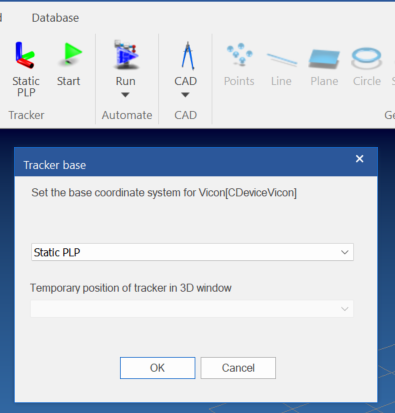
This is the current layout, it is the same dialog that you get from double clicking a tracker unit in the tree window (so that will disappear, or it should be replaced by an action that rolls out the gallery below the button)
And basically we want something like
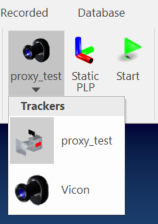
The list should contain the next elements (possibly grouped)
- Static alignments for the active tracker
- Additional quick placement options
- For later: dynamic reference capabilities
- Initialize on basis of 3D group or some 6DOF
- Choose to activate one which was initialized before
So this is a job for a gallery button, like the one we use for calculations. This offers the possibility to group items
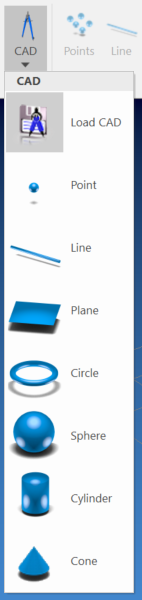
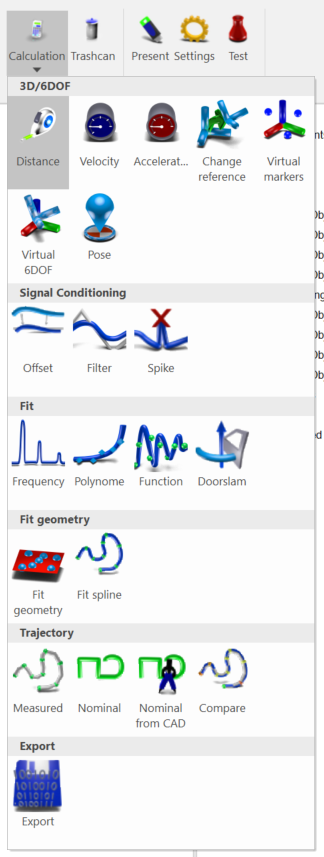
In a first faze we could go with the left approach, and later, when we add dynamic reference, go the right approach.
Quick recap on current implementation
key elements are:
- CChildFrameAlignment::OnAlignTrackerBase (IDC_ALIGN_TRACKER_BASE)
- CBCGPMyRibbonBar::ReflectActiveTracker
calls
This will select the tracker based on the serial contained in item tooltip of the button.
This runs CChildFrameAlignment::SelectTracker on basis of the given serial number string:
- calls CConfiguration::SetActiveTrackerSerial(serial)
- set active tracker in CConfiguration
- GetNodeFactory()->OnTrackerChange
- PostMessage(UM_ACTIVETRACKER_CHANGE, bSetSeparateCMMProgram, 0);
- calls StateManager.CommandSend(CCommandChangeTracker) to update the engine
ReflectActiveTracker sets all elements in the UI to ... reflect the active tracker.
It performs the next actions
- Updates text and icon of IDC_ALIGN_TRACKER : handles tracker choice
- Updates text and icon of IDC_ALIGN_TRACKER_BASE : handles current alignment for active tracker
The routine that we need to change is the one called when IDC_ALIGN_TRACKER_BASE is send, which calls CChildFrameAlignment::OnAlignTrackerBase(). This we have to change in a similar way to IDC_ALIGN_CAD
We have to create a CRibbonListButton on the fly and fill this with the static alignments available to that current tracker.
As often the case, turns out there is already a solution for a dynamic popup menu in the file RibbonListButton.h.
It is currently used by:
Icon | ID | Functions |
| IDC_ALIGN_TRACKER | CChildFrameAlignment::OnAlignSelectTracker CBCGPMyRibbonBar::ReflectActiveTracker CMainFrame::RibbonAlignFillTriggers |
| IDC_SAMPLER_SOURCE | CMainFrame::OnSamplerSource CMainFrame::RibbonAlignFillChannels CMainFrame::OnSamplerSource CMainFrame::AlignSelectChannel |
| IDC_ALIGN_SOURCE | CChildFrameAlignment::OnAlignSelectSource CChildFrameAlignment::OnConfiguration CMainFrame::RibbonActiveTrackerChange |
| IDC_SAMPLER_TRIGGER | CMainFrame::OnSamplerTrigger CMainFrame::RibbonAlignFillTriggers CMainFrame::OnSamplerTrigger CMainFrame::AlignSelectTrigger |
| IDC_VIEW_FLOAT | CMainFrame::OnViewFloat |
| IDC_ALIGN_CAD | CChildFrameAlignment::OnAlignCad CMainFrame::RibbonCreateAlignCAD |
| IDC_CONFIG_ADD_CALCULATION IDC_ANALYZER_ADD_CALCULATION | CChildFrameConfiguration::OnConfigAddCalculation CChildFrameRecorded::OnPerformCalculation |
CDCalculateTrajectoryNominal::InitRibbonBar | ||
CBaseGrid::RibbonFillExportTypesButton | ||
CDDataFeatureViewer::InitRibbonBar |




So we can update CRibbonListButton to accept a function that gets called in OnShowPopupMenu and the fills dynamically the contents.
Note that we still have CRibbonTrackerListButton. After implementing a button using the dynamic function for filling the list of tracker alignments, we should check if we can eliminate CRibbonTrackerListButton or alternatively if it can be used for selecting alignments since it does contain an array of UUID's.