
Small recap, the tree synchronization was not working yet in the case of a Vicon device. A configuration detect creates a complete tree from scratch, including all channels. The old method would not include these channels in the comparison, but that is not good: suppose you make a change that adds some channels, like the residual. Including all channels in a global map is not workable either since the same names come back a lot, so you would need to make ID strings
I might be getting there:
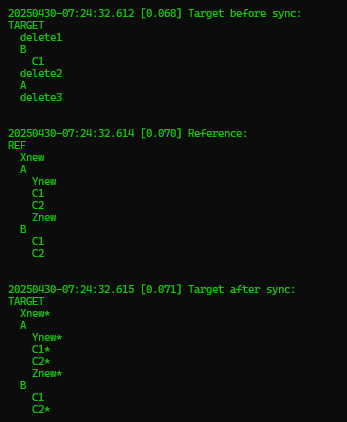
In this example A and B are configured to create a submap. A and B will create own submaps, so that C1 and C2, which are both in A and B, are not in the same global map.
As we can see in the result, Target has created new subs for A and B, except for C1 from B, which was also present in the original. So this works correct.
To recap the way the new CTreeSynchronizer works on a reference node called REFERENCE and a target node called TARGET. So the goal is to make TARGET look like REFERENCE without deleting any existing elements in TARGET.
The key function in CTreeSynchronizer is the function ID
This function will take a node and return an IDString which must be unique in the scope of a map. A map keeps track of all nodes in the target using the generated ID strings.
For this there is in CTreeSynchronizer there is a map of maps that points to nodes:
std::map<std::string, std::map<std::string, CNode *>> m_mapTarget;
The different maps also have ID strings, the root map is "\\".
The requirement for submaps comes from for examples a target node that has 2 6DOF elements. Each 6DOF element will have its own subgroups with channels, and these subgroups are the same for both elements. With only one top level map, we would have to create very long strings to isolate all the channels. So instead we create submaps that only contain those nodes associated with a particular node. This is the third parameter in the defaultGetMapID function.
Lets have a look at the ID function used for Vicon:
Depending on the type of node:
3D | Name is {parent 6DOF name}/{type string}{name of 3D} The mapID is set |
6DOF | Name is {type string}{name of 3D} The mapID is set |
other | Name is {parent}/{type}.{position} No mapID is set |
Suppose we have a node which is the x channel of a 3D that belongs to a 6DOF element, the node path for that channel is
6DOF_1/3D_2/pos/x
The 6DOF will have as ID: CConfig6DOF.6DOF_1 and this will be in the root map.
The 3D has : 6DOF_1/CConfig3D.Object14 and this will be in the map identified with CConfig6DOF.6DOF_1.
The x channel has pos/CConfigChannel.0 and will be in the submap 6DOF_1/CConfig3D.Object14
It is important that:
- all nodes are included
- the combination of map and id is unique
And to create the ID we can work with a combination of the next elements:
- Serial : this is preferred
- Name
- Order in the list
- Parent information like name or serial
CheckInitialize and run
Override excludechannels for the orientation part.
Tracker selection in alignment not working
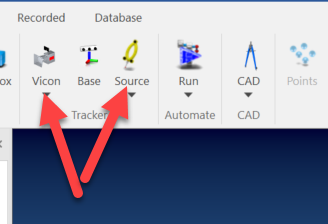
Yes, these two
Start with the ribbon designer to find the ID back.
ID's are:
- IDC_ALIGN_TRACKER
- IDC_ALIGN_SOURCE
Functions to check out are:
- CBCGPMyRibbonBar::ReflectActiveTracker
- CChildFrameAlignment::OnAlignSelectTracker
This is because the serial returned in CConfigOpticalTrackerUnit::GetSerial returns an empty string.
So I make it virtual and override it in COpticalTrackerMultiUnit to return the name of the device, like "Vicon" or "iGPS".
After these changes CBCGPMyRibbonBar::ReflectActiveTracker was working back.
Keyboard trigger not working when taking alignment points
For some reason the accept functionality still works, so lets start with that one.
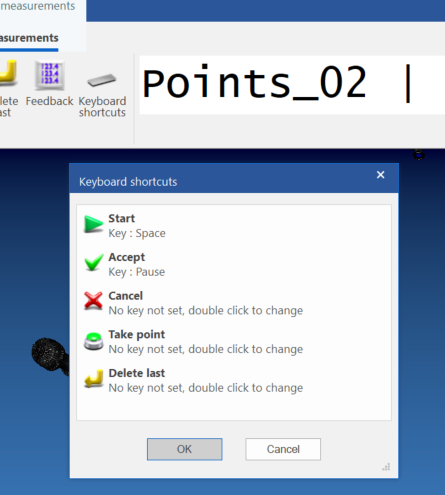
This can be found in C:\CTrack-software\Software\V5.0git\CTrack\DKeyboardShortcuts.h.
CMainFrame::OnKeyboardShortcuts() calls the dialog and sets the keys in CCTrackApp.
CCTrackApp has a map between keys and commands: m_mapCommandID. This is used in CCTrackApp::PreTranslateMessage:
- StateManager.CheckTriggerOverride
- KeyMapHandleMessage
bool CCTrackApp::KeyMapHandleMessage(MSG *pMsg)
{
    if (pMsg->message == WM_KEYDOWN)
    {
        CMainFrame *pMainFrame = (CMainFrame *)AfxGetMainWnd();
        if (pMainFrame)
        {
            CBCGPRibbonCategory *pCurrentCategory = pMainFrame->m_RibbonBar.GetActiveCategory();
            auto                &iter             = m_mapShortCutKeys.find(pCurrentCategory);
            if (iter != m_mapShortCutKeys.end())
            {
                auto &iterKey = iter->second.find(pMsg->wParam);
                if (iterKey != iter->second.end())
                {
                    UINT CommandID = iterKey->second;
                    pMainFrame->PostMessage(WM_COMMAND, MAKEWPARAM(CommandID, BN_CLICKED));
                    return true;
                }
            }
        }
    }
    return false;
}
So the keys are tied to the active ribbon. For the alignment measurements this is called "Measurements" and that is the key into this map.
This gives another map which, given a key, gives a command ID, which is then send with PostMessage(WM_COMMAND, ..).
The trigger button in alignment sends the command IDC_SAMPLER_TAKE_POINT
#define IDC_SAMPLER_START 1376
#define IDC_SAMPLER_TAKE_POINT 1473
They both start something, but we need points, so we took the wrong one
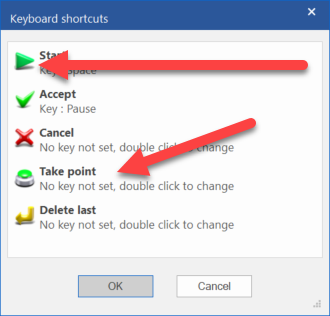
So it was actually not broken.
No GIT commits on this one.
Open problems
The dialog for registering keys is quite bad