
Purpose
To build an MCP that connects the Odoo API with Claude so that we can instruct Claude to build a website given a detailled set of examples and instructions.
I found out that Odoo has an API
This thus means that we could make an MCP that lets AI access the Odoo database, so we can then give instructions like build a website, make a model for keeping track of licenses etc.
How do we do this, we ask our main 3 AI model how to do this.
Of course, a bit of background information never hearts.
There was also a 101 at the recent Experience days, quite good:
MCP introduction
Here you go: https://towardsdatascience.com/model-context-protocol-mcp-tutorial-build-your-first-mcp-server-in-6-steps/
AI proposals
Gemini
https://g.co/gemini/share/a5c0e67a2093
Claude
https://claude.ai/share/c40d7e10-242a-4bd0-a4b4-b6e487b75b61
OpenAI
https://chatgpt.com/s/t_68de822a6a3c8191b70597042cbae21b
Building the MCP
For that we started in Visual Studio Code.
First made a folder D:\MCP\OdooWebsite
This we opened in Visual Studio Code.
Here is the conversation with Claude at prior
https://claude.ai/share/4eddfb3c-64a6-4db0-8998-ea3652fabe06
Started of with a question
I see that Odoo provides API keys, can these be used by for example Claude to do agentic work on a specific Odoo database?
and
with Odoo I'm interested in option 3 where you write an MCP server based on the JSON2 protocol from Odoo so that an agentic application can be written that connects to an existing Odoo database and as an example, where I could prompt to develop a website based on given picture examples and instructions on contents structure
and
1. Odoo 19 which has been released 2 weeks ago 2. Use https://edu-ctech.odoo.com/odoo 3. Website development
I also provided the doc website of the edu-ctech database
https://edu-ctech.odoo.com/doc
Then i switched to Visual Studio Code.
I did buy 5$ of credits in order to put a Claude API Key in, not sure if it was necessary.
In Visual Studio Code I continued with
I need help setting up the Odoo Website MCP Server we discussed. Create all the files from the artifacts.
Claude did remember the contents and went along to do his work.
I used the chat window with Claude Sonnet 4.5 in agent mode and with the API key I paid for.
The resulting work can be found on GitHub on this private repository :https://github.com/lucwens/OdooWebsite
Extended testing
Next test consisted of creating a complete new website, we took the example for the DiaWizard program, here is the original prompt
make a complete new website in odoo that is used to sell and promote a program called DiaWizard. DiaWizard is made to help with scanned dia's, so provide a product page that offers the possibility to download and buy a license, provide a forum page and provide a faq page. For the style base on https://www.sliderrevolution.com/design/technology-website-templates/
Claude did add the pages to the test database, and they looked very decent, have a look
I did run into problems making these pages the home pages, and instead of doing this myself I asked Claude to do this, but the tools were missing. So i asked Claude to give me a prompt that I could use back to Claude, but then inside Visual Studio Code.
Here is that prompt
I need to add website menu management tools to my Odoo MCP server.
Currently, I have tools for managing website pages, but I need to add
tools to manage the website menu structure.

Please add the following MCP tools to my Odoo website integration:

1. **list_website_menus**: List all website menus
   - Should return: menu id, name, url, parent_id, sequence
   - Use Odoo model: website.menu

2. **get_menu_details**: Get details of a specific menu item by ID
   - Parameters: menu_id
   - Return full menu item details

3. **create_website_menu**: Create a new menu item
   - Parameters: name, url, parent_id (optional), sequence (optional), new_window (optional)
   - Should create a menu item in website.menu model

4. **update_website_menu**: Update an existing menu item
   - Parameters: menu_id, name (optional), url (optional), parent_id (optional), sequence (optional)
   - Update fields in website.menu model

5. **delete_website_menu**: Delete a menu item
   - Parameters: menu_id
   - Remove from website.menu model

Please implement these using the same pattern as my existing page management
tools, with proper error handling and Odoo XML-RPC integration.
After a few iterations in Visual Studio Code this effectively did work.
The conversation was moved to the DiaWizard project in Claude.
Website interface
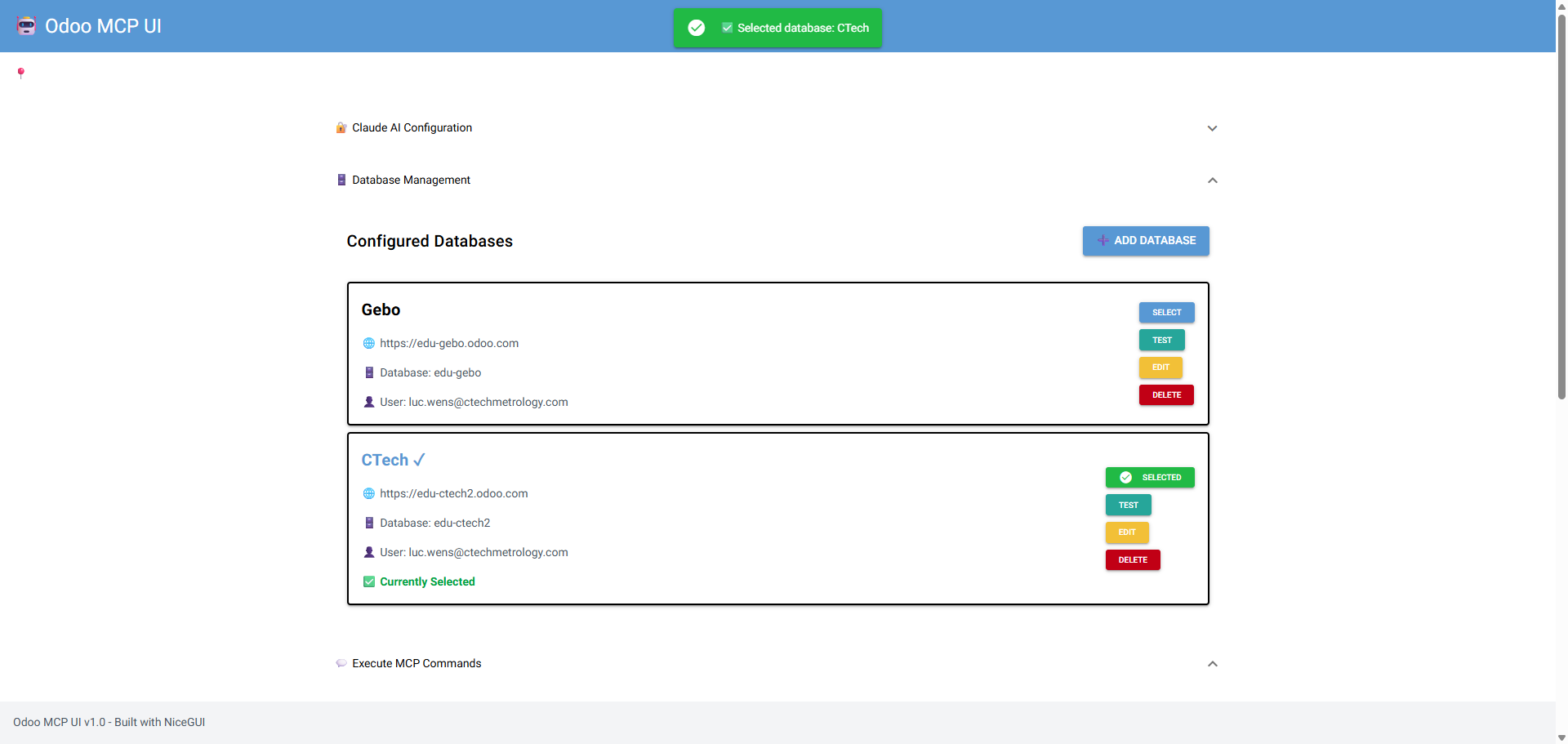
As an extension to the MCP server, I made a website where you can make a selection from a database of Odoo connections so you don't have to change this manually in Claude Desktop.
Project location
The project is part of the OdooWebsite project, locations
- Disk : D:\MCP\OdooWebsite\ui
- Github : https://github.com/lucwens/OdooWebsite/tree/ui-standalone
Get it to work
Inside visual code:
- Open a terminal
- PS D:\MCP\OdooWebsite> cd .\ui\
- PS D:\MCP\OdooWebsite\ui> .\start.bat
- UI will be available at: http://localhost:8080
Future ideas
Next website to build is the CTech website.
Some approach points
- Look for nice websites that can be used as example
- Do make a structure for the pages
- We can use the google drive mcp tool to give Claude access to pictures and the applications website in Odoo
- For CCZ I could give a link to the current website and ask to rebuild that as good as possible