
these are the errors
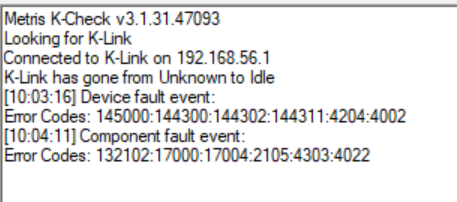
Which kind off translates to
KLinkWinObserver::UnpackFaultEvent() Error
(KLINKWINOBSERVER_UNPACKFAULTEVENT)
KPublicTCPServer::Connect() Error
(KCOREPUBLICTCPSERVER_CONNECT)
KSingleTCPConnection::Activate() Error
(KSINGLETCPCONNECTION_ACTIVATE)
KSingleTCPConnection::ChangeState() Error
(KSINGLETCPCONNECTION_CHANGESTATE)
Undocumented error code
KSocketTCP::OpenServerSocket() Error
(KSOCKETTCP_OPENSERVERSOCKET)
Socket error
Permission to create a socket of the specified type and/or protocol is denied. For file sockets, search permission is denied for a component of the path prefix, or write permission is denied on the directory containing the directory entry. (K600_EACCES)
The big question is of course which port is giving the problems.
On the old DELL Tower it did work, and it did work on the new Dell as well, somewhere in the past, so my best guess is that some other program is blocking a port.
Used ports
Analysis of the source code gives this list:
- #define KG2CAMERADRIVERPROTOCOL_CONFIGURATIONPORTNUMBER 10004
- #define KG2CAMERADRIVERPROTOCOL_SERVERCONTROLPORTNUMBER 50030
- #define KG2CAMERADRIVERPROTOCOL_SERVERDATAPORTNUMBER 50031
- #define KLINK_NETWORK_CONFIGURATION_PORT 10002
- #define KLINK_COMMANDPORT_ON_SERVER_TO_CLIENT 50020
- #define KLINK_DATAPORT_ON_SERVER_TO_CLIENT 50021
.... digging into my good old blog gives this article https://ctechmetrology.blogspot.com/2022/08/k-link-does-not-start-due-to-ports.html#more
Old blog article
K-Link does not start due to ports being blocked
Sympton
When you start K-Link, it gives this error

Normal K-Link will work, but as soon as CTrack is installed it will stop since the TCP ports for KPI are no longer available.
Cause
Programs can block a range of TCP ports, this is typically by Hyper V, Docker or WSL
This can be checked with the next command
netsh int ipv4 show excludedportrange protocol=tcp
Giving the next result
Start Port End Port
---------- --------
2869 2869
5357 5357
10243 10243
49814 49913
50000 50059 *
50260 50359
50460 50559
50608 50707
50913 51012
51013 51112
51113 51212
51235 51334
62703 62802
62803 62902
* - Administered port exclusions.
As you can see the range 50000 to 50059 blocks port 50505 and 50506 which is used by KPI.
Solutions
Quick work around
As a quick work-around, you can type the next 2 commands
net stop winnat
net start winnat
If you type netsh again, you will see that the range is much smaller and the KPI port is available, now K-Link will work.
However, this needs to be done after each restart, so not a final solution.
Solution 1 : working definitive solution
Or as an alternative keep hyper V but block the ports yourself
Expanding on the selected answer: if you have Hyper-V enabled, you can temporarily disable it during boot by using bcdedit:
bcdedit /Set {current} hypervisorlaunchtype off
Restart and exclude the necessary ports via:
netsh int ipv4 add excludedportrange protocol=tcp startport=50505 numberofports=100
Then simply re-enable Hyper-V, then restart:
bcdedit /Set {current} hypervisorlaunchtype auto
This prevents having to completely remove and re-add the Hyper-V feature, which requires several restarts.
Solution 2
A more definitive solution is to get rid of Hyper V all together
Note: Run the following commands in powershell (Run as administrator)
- Disable Hyper-V.
dism.exe /Online /Disable-Feature:Microsoft-Hyper-V - Remove all hyper-v related network adapters.
Get-HNSNetwork | Remove-HNSNetwork - Reboot.
Solution 3
Block the ports yourself with
netsh int ipv[46] set dynamic tcp start=49152 num=16384
Optionally disable the blocking of range of ports by
reg add HKLM\SYSTEM\CurrentControlSet\Services\hns\State /v EnableExcludedPortRange /d 0 /f
Further reading
- https://stackoverflow.com/questions/54010365/how-to-see-what-is-reserving-ephemeral-port-ranges-on-windows
- https://superuser.com/questions/1542885/how-can-i-know-what-is-preventing-my-socket-to-bind-to-localhost50060-50959
- https://stackoverflow.com/questions/48478869/cannot-bind-to-some-ports-due-to-permission-denied