
TL'DR
Besides the standard way of creating web pages, it is also possible to insert custom HTML kind of code in a block. And it should even be possible to show data from the Odoo database itself there.
Simple example node code coupling
Create with Canvas
Using the proposed Odoo web page color scheme, I asked Claude to update the color scheme for AptiSort. It came back with a table with codes, no colors, so I turned to Gemini and asked to add the colors there and make them adjustable. I used Canvas for this. Here is the link for the result
https://gemini.google.com/share/bf4ea835254d
And here is the link to the chatter:
https://gemini.google.com/share/8f03d7fb5b5b
Since this did not work in Odoo, mainly because of the React import, I asked Gemini to make the code Odoo compatible:
https://gemini.google.com/share/254ce0be7e9b
And this code block can be used
Inserting it in Odoo
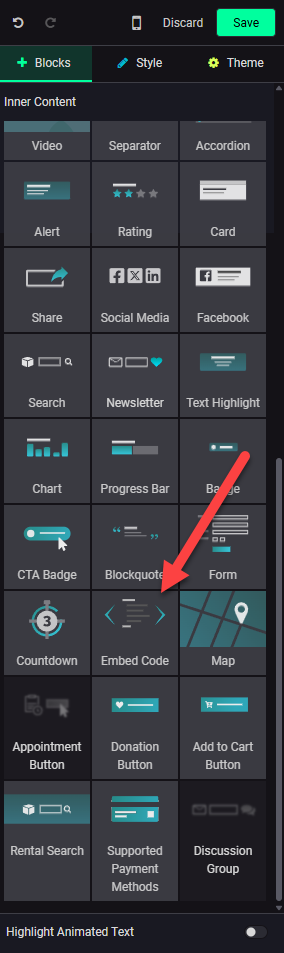
The key to embedding external code is the Embed Code block:
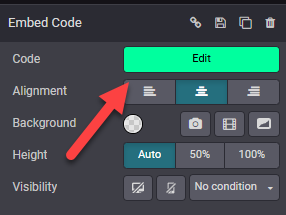
And once embedded click on Edit
Then you can paste the code there:
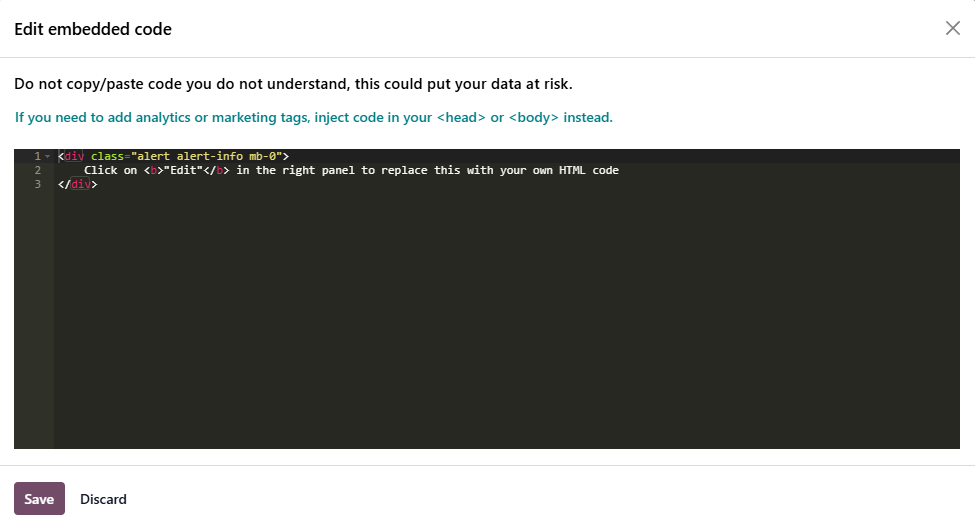
Let's try that here: in editting we just see a blue banner block, but once saved, it will really show what it contains
Using database elements
This might be a bit more tricky but it should be possible through the use of Odoo's JSON-RPC and React.
See this Gemini question
https://gemini.google.com/share/1a0172fd7a5c